

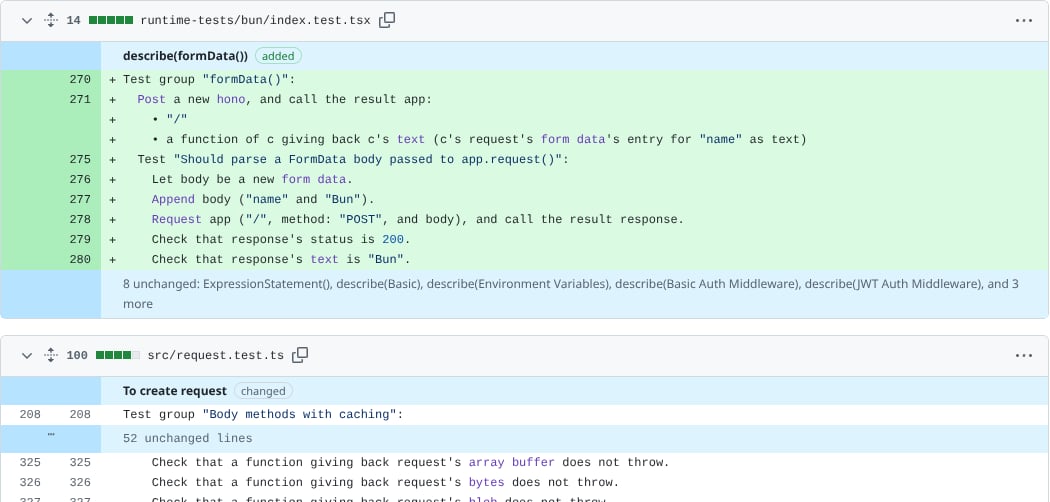
A pull request on github.com with the extension turned on. Added sentences are green, and unchanged declarations are folded into a summary line.
Install it
Narrator for GitHub is on its way to the Chrome Web Store, Firefox Add-ons, Edge Add-ons and the Mac App Store. Until it’s listed in your browser’s store, download it from the latest GitHub release and add it yourself. It takes about a minute.- Chrome, Arc, Edge, Brave
- Firefox
- Safari
1
Download it
Download narrator-for-github-chromium.zip and unzip it. Keep the folder somewhere it won’t be deleted, because the browser loads the extension from it every time it starts.
2
Open the extensions page
Go to
chrome://extensions. In Arc it’s arc://extensions, in Edge edge://extensions, and in Brave brave://extensions.3
Load it
Turn on Developer mode in the top right corner, click Load unpacked, and choose the folder you unzipped.
Build it from source instead
Build it from source instead
From the repository root, run
bun install and then bun apps/extension/build.ts. Load apps/extension/chrome/dist in a Chromium browser, or apps/extension/firefox/dist/manifest.json as a temporary add-on in Firefox. On a Mac with Xcode, bun run safari in apps/extension builds the Safari app into apps/extension/safari-build.Turn it on and off
Open GitHub’s diff settings menu (the gear icon above the diff) and toggle Narrator (English). The same switch is on the extension’s options page. The setting is remembered per browser. When it is off, you see GitHub’s normal diff.Add a GitHub token
Without a token, the extension can only read public repositories, and GitHub allows 60 anonymous API requests an hour. Open the extension’s options page (from the extension’s details in your browser, or Options in its menu) and paste a token under GitHub token. A fine-grained token with read-only Contents and Pull requests access is enough. With a token the extension can read private repositories you have access to, and the limit rises to 5,000 requests an hour. The token is kept in the browser’s extension storage and is only ever sent toapi.github.com and raw.githubusercontent.com. The extension collects no data at all; the privacy policy has the details.
What you’ll see
Each changed declaration is shown as a unit with its English, using the same rows as GitHub’s diff: removed sentences on the left or in red, added sentences on the right or in green, and edited sentences with the changed words highlighted. Functions that moved between files or were renamed are labelled as such instead of showing up as a deletion plus an addition. See Units and diffs for how that matching works. If a file’s English did not change at all, for example because the edit only touched imports, types, formatting or string contents, the extension says so and shows the code instead.How it stays fast
The content script on the GitHub page hands each request to the extension’s background script, which does the fetching and narrating. On Chromium, narration runs in a module worker inside an offscreen document, because service workers can’t load code on demand. For each pull request or commit, the extension:- Asks GitHub for the change and its list of files.
- Fetches both versions of each changed TypeScript or JavaScript file from
raw.githubusercontent.com, which doesn’t count against the API limit. - Lists the repository’s files with a single git trees API call, picks out the
package.jsonfiles in each changed file’s directory and its parents, and fetches only those. See Dependency detection. - Loads the WASM parser, and then only the plugin chunks for libraries those manifests list. A change to a React app never downloads the Temporal plugin. The SQL parser is only fetched when a changed file contains something that looks like SQL.
- Picks each plugin’s major version per package, so an Effect 3 package and an Effect 4 package in the same monorepo each get the right reading.
Package it for the stores
Fromapps/extension, bun run package:chrome, package:edge, package:firefox and package:safari build the extension and write upload-ready zips to apps/extension/store/out. The Firefox command also writes the source archive that addons.mozilla.org asks for, with build instructions, and rebuilding from that archive gives a byte-identical package. Listing copy, images and a launch checklist for each store live in apps/extension/store.
Limits today
- No plugin settings. Plugins are chosen automatically from the repository’s manifests, and there is no way yet to add your own plugins or turn one off.
- Large pull requests. Every changed file is fetched and narrated, so very large pull requests take longer and, without a token, can use up the anonymous rate limit.
- TypeScript and JavaScript only. Other languages are shown as GitHub’s normal diff.